

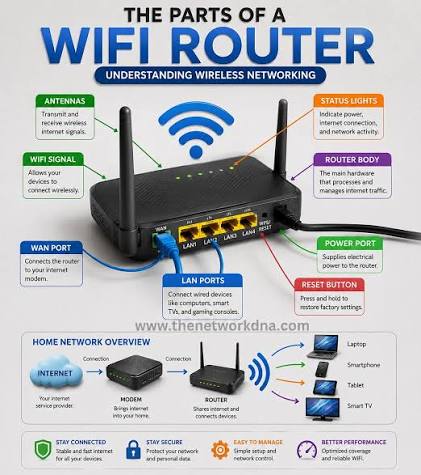
There is a question that comes up the moment someone gets comfortable with rule-based routing on their laptop: why stop at the laptop? The television in the living room has no idea what a rule set is. The games console will never respect a system proxy setting. The smart plug in the hallway talks to a server somewhere and nobody has ever looked at what it says.
The obvious answer is to move the rule engine down a layer — onto the router, or onto a small always-on machine that sits between the router and everything else. That works, and plenty of people run it that way. It also costs you things you may not have noticed you were relying on.
This piece lays out both placements honestly: what each one can see, what each one cannot, where the hardware limits bite, and how to decide based on how many people and how many devices you are actually serving.
What Changes When You Move Down a Layer
A rule engine makes decisions using whatever metadata it can observe about a connection. The placement determines what that metadata contains, and that single fact drives almost every trade-off that follows.
On the desktop, the engine runs as a process on the same operating system as the applications it is routing. It can therefore ask the kernel which program opened a given socket. That is where PROCESS-NAME rules come from, and they are genuinely useful — you can send your package manager one way and your browser another without either of them knowing.
On a router, that information does not exist. The router sees a packet arriving from an IP address on the local network. It knows the source device. It does not know, and cannot know, which application on that device produced the packet. Your rules therefore shift from being about programs to being about hosts.
- Desktop placement can match on domain, IP, GEOIP, rule sets and process name.
- Router placement can match on domain, IP, GEOIP, rule sets and source IP — but never process.
- Router placement gains something in return: it sees every device, including ones that have no settings screen at all.
The Case for Keeping It on the Desktop
Running the engine on the machine you actually work on is the path of least resistance, and it is the right answer more often than router enthusiasts like to admit.
You have real CPU to spend
Encryption is arithmetic, and arithmetic needs cycles. A modern laptop CPU with AES hardware acceleration will saturate a domestic connection without breaking a sweat. Consumer router SoCs frequently cannot, and the ceiling shows up as a throughput cap you cannot configure your way out of.
Debugging is a window, not an SSH session
When a site fails to load, you want to see which rule matched and which node was chosen, immediately. A desktop client gives you a live connections list, a rules viewer and a latency test button. On a headless box you are reading logs over SSH and correlating timestamps.
Profiles switch in one click
Desktop clients make it trivial to keep several profiles and swap between them — one tuned for work, one for a specific project, one minimal set for travel. Doing the equivalent on a router usually means editing a file and restarting a service.
The obvious limit
It covers exactly one machine. Your phone, your tablet, the television, the console and every sensor in the house are all outside the engine entirely.
The Case for the Router or a Small Always-On Box
Router-level placement inverts the picture. You lose per-application granularity and gain universal coverage.
The devices that benefit most are the ones with the least configurability. A streaming stick has no proxy settings. A console has a rudimentary network menu and nothing resembling a rule list. An IoT device has whatever the manufacturer decided to ship. If you want any routing policy applied to those, it has to happen upstream of them.
There is also a consistency argument. One rule set, one place to edit it, one place where the behaviour is defined. Nobody has to remember whether the tablet was configured last spring.
Where it gets uncomfortable
- Hardware headroom. Rule sets live in memory. GEOIP databases live in memory. A device with 128 MB of RAM will struggle with a large rule set long before it struggles with throughput.
- Single point of failure. If the box wedges, the whole household loses internet, not just you. That is a support burden as much as a technical one.
- Update friction. Testing a config change on a laptop costs nothing. Testing it on the device everyone routes through costs goodwill.
- Weaker observability. You can still read a connections log, but you will be doing it in a browser tab pointed at a dashboard, not in an app on the machine in front of you.
Side by Side
DimensionDesktop / laptopRouter or always-on boxDevices coveredOneEverything on the LANPer-application rulesYes, via PROCESS-NAMENo — source IP onlyThroughput ceilingEffectively the link speedBounded by the SoCMemory for rule setsAbundantOften the binding constraintDebuggingGUI, live log, one clickSSH or a web dashboardBlast radius of a mistakeYouThe householdCovers phones and TVsNoYesRoams with youYesNo — LAN only
The Hybrid Arrangement Most People End Up With
In practice the two placements are not rivals. The stable arrangement is a broad, conservative policy at the gateway and a detailed, personal policy on the workstation.
The gateway box runs a small rule set: block known telemetry endpoints, keep local subnets direct, apply one sensible default for everything else. It is deliberately boring, because boring things do not wake you up. Meanwhile a desktop clash client on your own machine carries the detailed work — process rules, several policy groups, the rule sets that change weekly — because that is where you can iterate without consequences for anyone else.
The one thing to get right is avoiding double processing. If the desktop client is already handling a connection, the gateway should let it through untouched rather than re-evaluating and re-encrypting it. Give the workstation a source-IP exemption at the gateway:
rules:
  # Workstation handles its own routing — pass through
  - SRC-IP-CIDR,192.168.1.40/32,DIRECT

  # Keep the LAN and gateway local
  - IP-CIDR,192.168.0.0/16,DIRECT
  - IP-CIDR,10.0.0.0/8,DIRECT

  # Household-wide blocks
  - RULE-SET,telemetry,REJECT

  # Everything else takes the default
  - MATCH,Household
Tools built on the Mihomo core behave identically whichever layer they run on, so a rule you validated on your laptop will do the same thing at the gateway. Desktop clients such as Clash Verge Rev are a comfortable place to draft and test a rule set precisely because the feedback loop is instant — you can watch the connections log confirm the match before you copy anything to the box everyone depends on.
Gateway Mode and How Traffic Actually Arrives
A rule engine on a small box only sees traffic that is directed at it. There are three common ways to arrange that, in increasing order of invasiveness.
- Per-device proxy settings. Point individual devices at the box’s HTTP or SOCKS listener. Simple, reversible, and useless for devices with no proxy setting.
- Default gateway. Hand out the box’s address as the gateway via DHCP. Every device routes through it by default, which is the point and also the risk.
- TUN mode on the box. A virtual adapter pulls forwarded traffic into the rule engine at the network layer, catching UDP and anything that ignores proxy settings entirely.
Whichever you choose, keep a documented way back. A second SSID on the plain router, or a DHCP reservation that hands out the ISP gateway, means a failed experiment is a thirty-second recovery rather than an evening.
Hardware, realistically
- Aim for at least 512 MB of RAM if you intend to load GEOIP data and several rule sets.
- Prefer a CPU with AES instructions; software-only encryption is the usual throughput bottleneck.
- Gigabit Ethernet on the box, wired. Wireless bridging a gateway is a false economy.
- Anything from a low-power mini PC to a modern single-board computer clears these bars comfortably.
Where DNS Should Sit
DNS placement causes more confusion than the routing itself, because a name resolved in the wrong place produces an address that sends the connection down the wrong path.
The principle is simple: resolve the name on the same side as the exit you intend to use. If a connection will leave through a remote node, the name should ideally be resolved from that node’s vantage point, so you get the CDN edge nearest the exit rather than nearest your living room.
Practically, that means letting the rule engine own DNS rather than leaving it to each device:
dns:
  enable: true
  listen: 0.0.0.0:53
  enhanced-mode: fake-ip
  fake-ip-range: 198.18.0.1/16
  fake-ip-filter:
    - "*.lan"
    - "*.local"
  nameserver:
    - 192.168.1.1        # ISP resolver for local names
  fallback:
    - https://1.1.1.1/dns-query
Two gotchas are worth naming. Fake-IP mode breaks anything that expects a real address before connecting, so keep local domains in the filter list. And if you run DNS on the gateway, hand it out over DHCP — otherwise devices with hardcoded resolvers will quietly bypass you.
Choosing Based on Your Actual Household
Strip away preference and the decision comes down to who and what you are serving.
- One person, one main machine. Desktop only. A gateway box adds a failure mode and buys you nothing.
- One person, phone and laptop. Desktop for the laptop, plus a lightweight client on the phone. Still no gateway.
- Two or three people, a TV and a console. This is where a gateway starts paying off. Keep a desktop client for your own detailed rules.
- A house with IoT devices you did not choose. Gateway, unambiguously — it is the only place you can see or shape that traffic.
- Anyone who travels. Keep the desktop client regardless. A gateway stops helping the moment you leave the building.
Common Questions
Can I run both without them fighting?
Yes, provided one defers to the other. Exempt the workstation’s source IP at the gateway so its already-routed traffic passes straight through. Without that exemption you get two layers of encryption, measurable latency, and a connections log that is hard to reason about.
Will an old router handle this?
Usually not well. The limit is rarely a hard failure — it is a throughput ceiling and memory pressure that shows up as slowness under load. If the device predates gigabit Ethernet or ships with under 256 MB of RAM, put the engine on a separate small machine and leave the router routing.
How do I apply different policies per device without process rules?
Use source IP as the identity. Give each device a DHCP reservation, then write SRC-IP-CIDR rules that send the television to one policy group and the work laptop to another. It is coarser than process matching but it covers the common cases.
What breaks first when a gateway box is overloaded?
Throughput degrades before anything crashes. Large downloads plateau below the link speed, latency under concurrent load rises, and DNS starts to feel sluggish because the resolver is competing for the same cycles. Watch memory and connection counts rather than waiting for an outage.
Wrapping Up
Neither placement is the sophisticated one. They answer different questions. The desktop knows which program is talking and gives you a fast, safe loop for iterating on rules; the gateway knows every device and reaches the ones with no settings at all.
If you are serving yourself, stay on the desktop and keep the whole thing simple. If you are serving a household full of appliances that will never have a configuration screen, put a modest rule set on a small always-on box and keep the interesting rules on your own machine. The layered version — boring downstairs, detailed upstairs — is the one that tends to still be running a year later.
